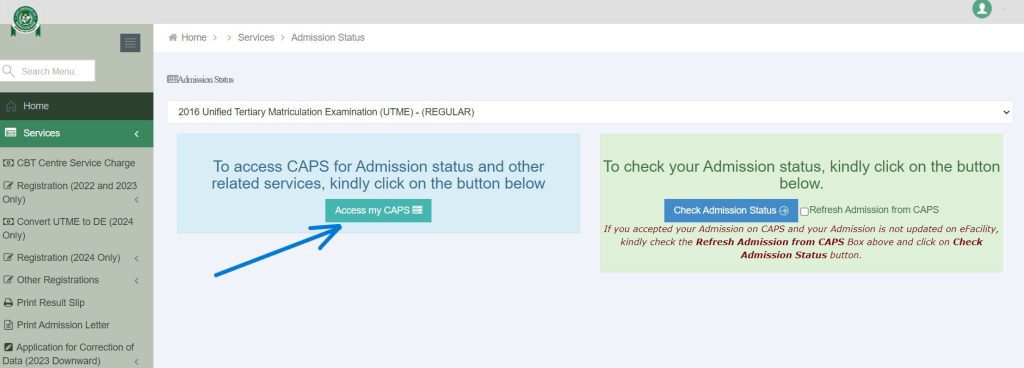
The JAMB CAPS System for 2026/2027 Admission is an online platform created by JAMB to manage and monitor admission into Nigerian universities, polytechnics, colleges of education, and other tertiary institutions.
If you are seeking admission in the 2026/2027 academic session, understanding the JAMB CAPS System is one of the most important things you can do.
Many students spend months preparing for JAMB, work hard to score high marks, and meet their school’s requirements. Yet, some still lose admission opportunities because they do not understand how CAPS works.
The thing is, admission is no longer handled only by schools. Today, JAMB CAPS System serves as the platform where admission recommendations, approvals, acceptance, and monitoring take place.
Think of CAPS as a central admission control room.
Your school can recommend you for admission, but you still need to monitor your CAPS profile to know what is happening with your admission status.
Have you ever heard a student say:
“I saw admission on my school portal but nothing is showing on JAMB CAPS.”
Or:
“My friend has accepted admission already but mine is still showing Admission in Progress.”
These situations happen every year because many candidates do not fully understand the JAMB CAPS System.
I will show you everything you need to know in simple English.
By the end of this guide, you will understand:
- What CAPS means
- Why it was introduced
- How it works
- How to check your admission status
- How to accept admission
- Common CAPS problems and solutions
Let’s start with the basics.
Read also:
- Can I Get JAMB Admission Without Writing JAMB in 2026/2027?
- What to Expect After Getting JAMB Admission in 2025/2026
What is the JAMB CAPS System?
Full Meaning of JAMB CAPS
CAPS stands for:
Central Admission Processing System.
It was created by JAMB to make admission into tertiary institutions more transparent and fair.
You can learn more about JAMB through its official website:
JAMB
Before CAPS was introduced, many students complained about admission irregularities.
Some candidates did not know why they were denied admission.
Others claimed that admissions were given unfairly.
To solve these issues, JAMB introduced CAPS so that admission activities could be monitored from one platform.
Today, nearly every admission into Nigerian tertiary institutions passes through CAPS.
Whether you applied to a university, polytechnic, or college of education, your admission will likely be processed through the JAMB CAPS System.
Why JAMB Introduced CAPS
The main aim was to create a fair admission system.
Before CAPS, many students faced problems such as:
- Lack of transparency
- Admission irregularities
- Delayed admission updates
- Difficulty monitoring admission decisions
With CAPS, candidates can now see important admission updates directly from their accounts.
This helps reduce confusion.
For example, imagine two students:
Student A scores 280.
Student B scores 180.
If Student B receives admission before Student A, people may start asking questions.
CAPS helps institutions justify admission decisions using clear criteria.
This makes the system more open.
How CAPS Changed the Admission System
The introduction of CAPS changed admission management in many ways.
First, candidates can now track their admission status online.
Second, schools can recommend candidates electronically.
Third, JAMB can monitor admission activities across institutions.
This has helped reduce many admission-related complaints.
A student sitting in Port Harcourt can monitor admission updates without traveling to the school.
Another student in Kano can do the same.
This makes admission tracking easier for everyone.
Most importantly, CAPS gives candidates the power to either accept or reject admission offers.
That was not common years ago.
When an admission offer appears on your CAPS dashboard, you can decide whether to accept it or reject it.
That is one reason why checking CAPS regularly is important.
Why Every 2026/2027 Candidate Must Understand CAPS
Many candidates focus only on writing JAMB.
But admission does not end after the examination.
After your results are released, several things happen behind the scenes.
Schools review applications.
Departments screen candidates.
Admission lists are prepared.
Recommendations are submitted.
Approvals are granted.
Most of these activities eventually reflect on CAPS.
If you do not understand the platform, you may miss important updates.
Imagine receiving admission and not knowing it because you never checked your CAPS account.
It happens more often than many people think.
That is why understanding the JAMB CAPS System for 2026/2027 Admission is not optional.
It is something every admission seeker should know.
How CAPS Connects Candidates, Schools, and JAMB
One way to understand CAPS is to see it as a bridge.
On one side, you have the candidate.
On another side, you have the institution.
Then you have JAMB monitoring the entire system.
When a school decides to admit a student, the recommendation moves through CAPS.
The candidate can then see the update.
The candidate may accept or reject the offer.
This creates a clear communication channel among all parties involved.
Without CAPS, tracking these activities would be much harder.
What You Should Remember About JAMB CAPS
If you remember only one thing from this section, remember this:
JAMB CAPS is the official platform used to manage and monitor admission activities for Nigerian tertiary institutions.
Every serious admission seeker should understand how it works.
Checking your CAPS account regularly can help you stay informed and avoid unnecessary surprises during the admission season.
In the next section, we will discuss How the JAMB CAPS System Works for 2026/2027 Admission, including the roles of schools, JAMB, and candidates.
How the JAMB CAPS System Works for 2026/2027 Admission
Understanding how the JAMB CAPS System works can save you from confusion during the admission season.
Many students think admission starts and ends with their JAMB score.
But the truth is different.
Your JAMB score is only one part of the admission decision.
Schools, departments, screening results, O’Level grades, catchment considerations, and available spaces can all play a role.
The JAMB CAPS System brings all these admission activities together in one place.
Let me explain it in a simple way.
Imagine CAPS as a large office where admission records from different schools are checked and monitored.
When schools are ready to admit students, they send recommendations through CAPS.
JAMB reviews and manages the admission activities through the platform.
Candidates can then see updates on their admission status.
That is the basic idea behind the system.
The Role of Schools in CAPS
Schools are among the most important users of CAPS.
Without the schools, there would be no admission recommendations to process.
How Schools Select Candidates
After the JAMB examination and screening exercises, schools begin reviewing applicants.
They may look at:
- JAMB score
- O’Level results
- Post-UTME score
- Departmental requirements
- Available admission quota
Every school has its own admission requirements.
For example, a candidate applying for Medicine may need a higher score than someone applying for another course.
Once the school completes its review, qualified candidates may be recommended for admission through CAPS.
How Schools Send Admission Recommendations
Schools do not simply announce admission and stop there.
They submit recommended candidates through the CAPS platform.
This recommendation tells JAMB that the institution wants specific candidates to be considered for admission.
If your name is among the recommended candidates, your admission status may begin to change on CAPS.
This is one reason students often see messages like:
- Admission in Progress
- Recommended for Admission
- Offered Admission
The update usually starts after the school submits admission recommendations.
Why Schools Cannot Admit Everyone
Every year, thousands of students apply for admission.
The available spaces are usually much smaller than the number of applicants.
Let me give you an example.
Suppose 10,000 students apply for a course.
The department may only have space for 300 students.
Even if many candidates perform well, the school still has to select those who meet its requirements and fit into the available quota.
This is why meeting a cut-off mark does not always guarantee admission.
The Role of JAMB in CAPS
While schools recommend candidates, JAMB supervises the admission system through CAPS.
Monitoring Admission Activities
One major purpose of CAPS is monitoring.
JAMB uses the platform to oversee admission decisions made by institutions.
This helps improve transparency.
Candidates can also see updates themselves instead of depending entirely on rumours or unofficial information.
That is one reason many students check CAPS regularly.
Ensuring Fairness in Admissions
JAMB introduced CAPS partly to reduce admission complaints.
The platform helps create a more structured admission system.
When schools submit admission recommendations, the information becomes part of the central admission record.
This makes admission activities easier to track.
For candidates, it means there is an official platform where admission updates can be viewed.
Maintaining Admission Records
CAPS also serves as an admission database.
Information relating to candidates and admission decisions can be stored and monitored through the system.
This helps keep admission records organized.
Instead of admission details being scattered across different locations, much of the information is managed through one platform.
The Role of Candidates in CAPS
Many students think CAPS is only for schools and JAMB.
That is not true.
Candidates also have important responsibilities.
Monitoring Admission Status
One of the most important things you should do is check your admission status regularly.
Admission updates can change at different times.
A candidate who sees “Not Admitted” today may later receive admission.
Another candidate may see “Admission in Progress” before eventually receiving an admission offer.
Because of this, regular monitoring is important.
Providing Correct Information
Candidates must ensure that their details are accurate.
Mistakes in personal information can create admission challenges.
Always make sure:
- Your names are correct
- Your date of birth is correct
- Your O’Level details are properly uploaded
- Your course information is accurate
Small errors can sometimes create unnecessary delays.
Accepting or Rejecting Admission
CAPS gives candidates the power to make a decision when admission is offered.
Once an admission offer appears, you can:
- Accept Admission
- Reject Admission
Many students are excited when they finally see an admission offer.
But some candidates reject admission because:
- They want another school
- They want another course
- They plan to try again next year
Whatever decision you make, it should be done carefully because admission decisions can have consequences.
We will discuss this in detail later in the article.
What Happens After You Meet a School’s Requirements?
Meeting the Cut-Off Mark Is Only the Beginning
Many students believe that scoring above a school’s cut-off mark guarantees admission.
The thing is, admission decisions involve more than one factor.
For example:
A university may set a cut-off mark of 180.
You score 220.
That sounds good.
But if thousands of other candidates score higher and apply for the same course, competition becomes tougher.
This is why some students who meet the cut-off mark still do not receive admission.
Your Records Are Reviewed
After meeting the requirements, your records may be reviewed by the institution.
The school checks whether you satisfy its admission conditions.
This may include:
- Subject combinations
- O’Level grades
- Screening results
- Course requirements
Candidates who meet the conditions may move closer to admission consideration.
Admission Recommendation May Follow
If the school is satisfied with your qualifications, it may recommend you for admission through CAPS.
At this stage, your admission status may begin to change.
Some candidates become excited when they notice new updates.
Others become nervous because they do not understand what the statuses mean.
Do not worry.
In the next section, I will explain the most common admission statuses you may see on the JAMB CAPS System for 2026/2027 Admission.
The JAMB CAPS System works through cooperation between schools, JAMB, and candidates.
Schools recommend candidates.
JAMB monitors the admission activities.
Candidates check their status and respond to admission offers.
When you understand these roles, admission updates become easier to follow.
Instead of depending on rumours, you can monitor your admission journey directly through CAPS.
Important Admission Statuses You Can See on JAMB CAPS
One of the biggest reasons students check the JAMB CAPS System is to know their admission status.
Every year, many candidates log into CAPS and see different messages.
Some become happy.
Some become worried.
Others become confused because they do not know what the messages mean.
Have you ever checked your CAPS account and seen a status that left you wondering what was happening?
You are not alone.
Many candidates experience the same thing.
The good news is that most admission statuses have simple meanings.
Once you understand them, it becomes easier to follow your admission journey.
Let me explain the most common statuses you may see on the JAMB CAPS System for 2026/2027 Admission.
Admission in Progress
This is one of the most common statuses candidates see.
What Admission in Progress Means
When CAPS displays “Admission in Progress,” it means your admission is still being considered.
It does not mean you have been admitted yet.
It also does not mean you have been rejected.
Think of it like a file sitting on an office table waiting for final approval.
The admission review is still ongoing.
At this stage, patience is important.
Should You Be Worried?
No.
Many students panic when they see this status.
The thing is, “Admission in Progress” is often a positive sign.
It usually means that admission activities concerning your application are still underway.
Some candidates eventually receive admission after seeing this status.
Others may experience status changes later.
This is why regular monitoring is important.
Recommended for Admission
This status usually creates excitement among candidates.
What Recommended for Admission Means
When a school recommends you for admission, it means the institution has selected you and forwarded your details through CAPS.
This can be a positive development.
The school believes you meet the requirements for admission consideration.
Does Recommended for Admission Mean You Have Been Admitted?
Not exactly.
Many students make this mistake.
Being recommended is not always the same as receiving a final admission offer.
You should continue monitoring your CAPS profile until a final admission decision appears.
Why This Status Is Important
This status often shows that your application is moving forward.
Many students eventually receive admission after being recommended.
That is why candidates usually pay close attention when they see this update.
Offered Admission
This is the status most candidates hope to see.
What Offered Admission Means
When CAPS displays “Offered Admission,” it means an admission offer has been made available to you.
At this stage, CAPS usually gives you the option to:
- Accept Admission
- Reject Admission
This is one of the most important moments in the admission journey.
What You Should Do When You See Offered Admission
First, stay calm and carefully review the details.
Check:
- Institution name
- Course offered
- Admission information displayed
If everything looks correct and you are happy with the offer, you may proceed with acceptance.
Many students rush through this stage because of excitement.
Take a few minutes to review the information properly.
Why Some Students Miss Their Admission Opportunity
Let me tell you a simple story.
A student checked CAPS once and saw “Admission in Progress.”
He assumed nothing important would happen soon.
Weeks later, admission was offered.
Because he stopped checking CAPS regularly, he did not notice the update quickly.
Situations like this are why candidates should monitor CAPS consistently during admission season.
Not Admitted
This status often causes concern among candidates.
What Not Admitted Means
When CAPS shows “Not Admitted,” it means admission has not been offered at that time.
This message can appear for different reasons.
It does not always mean your admission chances are permanently over.
Admission updates can still occur later depending on the institution and admission activities.
Should You Lose Hope?
Not necessarily.
Many students see “Not Admitted” during early admission periods.
Some later receive updates after schools release additional admission lists.
The thing is, admission exercises often happen in stages.
This is why candidates should continue checking official updates.
What You Should Do
Instead of panicking:
- Keep monitoring CAPS
- Follow updates from your institution
- Ensure your O’Level results are properly uploaded
- Check that your admission records are correct
Staying informed is usually better than relying on rumours.
Other Admission Messages You May See
Apart from the major statuses already discussed, candidates sometimes encounter other messages.
No Admission Given Yet
This generally means no admission offer has been made available to you at that time.
Your application may still be under consideration.
Awaiting Recommendation
This may indicate that the admission recommendation stage has not been completed.
The school may still be working on admission activities.
Status Changes Can Happen
One important thing to understand is that admission statuses can change.
For example:
| Earlier Status | Later Status |
|---|---|
| Not Admitted | Admission in Progress |
| Admission in Progress | Recommended for Admission |
| Recommended for Admission | Offered Admission |
This is why checking CAPS only once is not enough.
What Each Status Means for Your Admission
The easiest way to understand CAPS statuses is to think of them as stages.
| Status | Simple Meaning |
| Admission in Progress | Admission review is ongoing |
| Recommended for Admission | School has recommended you |
| Offered Admission | Admission has been given |
| Not Admitted | No admission offer at that moment |
Remember: admission status can change as schools continue their admission activities.
Common Mistakes Students Make When Checking Admission Status
Believing Every Rumour
Many students trust social media posts more than official admission updates.
That can create confusion.
Always focus on information available through official channels.
Checking Only Once
Admission activities can continue for weeks or months.
A status today may be different next week.
Checking regularly gives you a better understanding of what is happening.
Comparing Your Status With Friends
Your friend’s admission timeline may be different from yours.
Two students applying to the same school may receive updates at different times.
Do not panic simply because someone else’s status changed first.
Your admission status on CAPS tells you where you currently stand in the admission journey.
Each status has its own meaning.
Understanding these messages helps you make better decisions and avoid unnecessary fear.
Instead of relying on rumours, use the information displayed on your CAPS profile to track your admission progress.
How to Check Your Admission Status on JAMB CAPS
One question students ask every admission season is:
“How do I check my admission status on JAMB CAPS?”
The good news is that checking your admission status is not difficult.
You do not need special technical knowledge.
You only need the correct details and a device that can access the internet.
The thing is, many students make mistakes while trying to check CAPS.
Some use the wrong portal.
Some forget their login details.
Others do not know where to find the admission status section.
I will show you the correct way to do it.
Requirements Before Checking CAPS
Before you try to access the JAMB CAPS System, make sure you have a few important things ready.
Your JAMB Registration Number
Your registration number is one of the most important details you will need.
It helps identify your record in the JAMB database.
If you cannot remember it, check:
- Your JAMB registration slip
- Your examination slip
- Previous admission documents
Always keep your registration number safe.
Access to Your JAMB Profile
You should also have access to the email address and password linked to your JAMB profile.
Without these details, logging in may become difficult.
Many students forget the email address they used during registration.
This can create unnecessary stress later.
That is why it is always wise to keep your login details in a safe place.
A Good Internet Connection
CAPS is an online platform.
A stable internet connection helps pages load properly.
Poor network connections sometimes cause students to think the portal is not working.
In reality, the problem may simply be a weak connection.
Steps to Login to CAPS
Now let’s look at the basic steps.
Step 1: Visit the Official JAMB Portal
Go to the official JAMB website:
Always use the official portal.
Many fake websites appear during admission periods.
Using unofficial websites can expose your information to risks.
Step 2: Access Your JAMB Profile
Login using:
- Your email address
- Your password
After logging in, you will see your profile dashboard.
This area contains different services provided by JAMB.
Take your time and navigate carefully.
Step 3: Locate the CAPS Section
Once inside your profile, look for the CAPS option.
Depending on updates to the portal, the location may vary slightly.
Follow the available navigation links until you reach the CAPS dashboard.
Step 4: Open Admission Status
Inside CAPS, locate the admission status area.
This section displays updates relating to your admission.
You may see statuses such as:
- Admission in Progress
- Recommended for Admission
- Offered Admission
- Not Admitted
The status shown reflects your current admission situation.
How to Check Admission Through JAMB Admission Status Portal
Some candidates prefer using the admission status checking feature.
Access the Admission Status Page
After logging into your profile, locate the admission status checking section.
Select the admission year when required.
For 2026/2027 candidates, make sure the correct admission year is selected when available.
Submit Your Details
Enter any required information correctly.
Simple typing mistakes can produce incorrect results.
Double-check:
- Registration number
- Admission year
- Personal details
Accuracy helps prevent unnecessary confusion.
View Your Result
After submitting the required information, your admission status should appear.
Read the information carefully.
Do not rush through the page.
Many students miss important details because they focus only on the admission message.
Common Mistakes Students Make While Checking CAPS
Several mistakes occur every year.
Avoiding them can save you time and frustration.
Using Unofficial Websites
Some websites claim to provide admission updates.
The safest option is always the official JAMB portal.
Official information should be your main source.
Forgetting Login Details
Students often create email accounts during registration and forget the details afterward.
Months later, when admission starts, they struggle to access their profiles.
Keep your login information somewhere secure.
Checking Too Early
Admission activities happen at different times.
A student who checks today may not see the same result as someone who checks a few weeks later.
Patience is important.
If admission has not started fully, you may not see major updates immediately.
Depending Entirely on Friends
Have you ever heard someone say:
“My friend checked for me and said nothing is showing.”
That can be risky.
Whenever possible, check your own CAPS profile.
You can then see the information directly.
What If CAPS Is Not Loading?
Sometimes candidates encounter technical challenges.
Network Problems
Poor internet connectivity is one of the most common causes.
Try:
- Refreshing the page
- Switching networks
- Trying again later
Heavy Traffic on the Portal
During major admission periods, thousands of students may visit the portal at the same time.
This can slow things down.
If the portal is responding slowly, wait and try again later.
Browser Issues
Sometimes the problem comes from the browser.
You can try:
- Clearing browser cache
- Updating the browser
- Using another browser
Simple adjustments often solve the issue.
Why You Should Check CAPS Regularly
Checking CAPS once is usually not enough.
Admission activities may continue for weeks or even months.
A candidate who sees “Not Admitted” today could receive an update later.
Another candidate may move from:
Admission in Progress → Recommended for Admission → Offered Admission.
Because of this, regular monitoring is a smart habit.
You do not need to check every hour.
But checking periodically can help you stay informed.
Checking your admission status on JAMB CAPS is one of the easiest ways to monitor your admission progress.
You only need:
- Your login details
- Access to the internet
- Regular monitoring
Always use official channels and pay attention to the information displayed on your CAPS dashboard.
The next step after receiving admission is understanding how to respond to the offer.
In the next section, I will explain How to Accept or Reject Admission on JAMB CAPS, including what happens after you make your decision.
How to Accept or Reject Admission on JAMB CAPS
Seeing an admission offer on CAPS can be one of the happiest moments for any candidate.
After months of preparing for JAMB, attending screenings, and checking admission updates, you finally see the message you have been waiting for.
But many students become confused at this stage.
Questions start coming up:
- Should I accept the admission immediately?
- What happens if I reject it?
- Can I change my mind later?
- Will accepting admission affect another application?
These are important questions.
That is why every candidate should understand what accepting or rejecting admission means before making a decision.
When You Should Accept Admission
Accept If You Are Satisfied With the Offer
If the school and course offered are what you want, accepting the admission is usually the next step.
Before accepting, carefully check:
- Institution name
- Course offered
- Admission details displayed on CAPS
Make sure everything is correct.
Some candidates get excited and click buttons without reading properly.
Take a few moments to review the information.
Accept If You Are Ready to Continue Your Education
Admission is an opportunity to begin the next stage of your academic journey.
If you have decided that the institution and course fit your plans, accepting the offer shows your willingness to proceed.
Think about it this way.
You applied for admission because you wanted a place in a tertiary institution.
When that opportunity arrives, you should evaluate it carefully and make a decision.
How to Accept Admission on CAPS
The exact appearance of the portal may change from time to time, but the general steps are usually straightforward.
Login to Your JAMB Profile
Visit the official JAMB portal:
Login with your registered email address and password.
Open the CAPS Dashboard
Navigate to the CAPS section.
Locate your admission status.
If admission has been offered, you should see options relating to the admission decision.
Select Accept Admission
Carefully review the admission details.
If you are satisfied, click the Accept Admission option.
Once completed successfully, your admission record should reflect your decision.
Always confirm that the action has been recorded properly.
What Happens After Accepting Admission?
Many students think accepting admission is the final step.
The thing is, acceptance is important, but there may still be other activities to complete.
Your Acceptance Is Recorded
Once you accept the admission offer, the system records your decision.
This indicates that you have agreed to the admission being offered.
School Registration Activities May Follow
After acceptance, institutions may announce:
- Registration schedules
- Clearance exercises
- Documentation requirements
- Payment instructions
Candidates should follow information released by their schools.
Always rely on official announcements.
You Can Continue Monitoring Updates
Even after accepting admission, it is still wise to monitor your profile and admission-related information.
Staying informed helps you avoid missing important deadlines.
What Happens If You Reject Admission?
Some candidates choose to reject admission.
This may happen for different reasons.
Reasons Candidates Reject Admission
A student may reject admission because:
- The course offered is not preferred
- Another institution is being considered
- The candidate plans to wait for another admission opportunity
- Personal circumstances have changed
Every candidate has unique reasons.
Rejection Is a Serious Decision
Rejecting admission should never be done casually.
Before making that choice, ask yourself:
- Am I sure about this decision?
- Do I fully understand the consequences?
- What alternative plan do I have?
A few minutes of careful thinking can prevent future regrets.
Consider Your Long-Term Goals
Imagine a student who rejects admission because friends say a better offer may come later.
Weeks pass.
Months pass.
The expected admission never arrives.
The student then wishes the original admission had been accepted.
This is why decisions should be based on facts, not rumours.
Can You Change Your Mind After Rejecting Admission?
Why You Should Be Careful
Many candidates ask this question every year.
The safest approach is to avoid rejecting admission unless you are completely certain.
Admission decisions can affect your educational plans.
Because admission situations differ, candidates should always seek official guidance when uncertain.
Think Before Clicking
The acceptance and rejection buttons may look simple.
But the decision behind them is important.
Before making any choice:
- Read carefully
- Understand your options
- Consider your future plans
A few minutes of careful consideration can save you from unnecessary stress later.
Common Mistakes Candidates Make During Admission Acceptance
Accepting Without Checking the Course
Some students focus only on gaining admission.
They forget to verify the course offered.
Always check both the institution and the course.
Following Social Media Rumours
Admission season often comes with rumours.
One person says:
“Don’t accept yet.”
Another says:
“Reject it and wait.”
The problem is that many of these people do not know your personal situation.
Base your decision on verified information.
Delaying for Too Long
Some candidates wait endlessly because they are unsure.
While it is good to think carefully, it is also important to pay attention to official deadlines and instructions.
Keeping track of updates can help you make timely decisions.
Why Acceptance Is an Important Part of the JAMB CAPS System
One of the goals of CAPS is to give candidates a voice in the admission system.
Instead of admission being handled entirely behind the scenes, candidates can now respond to offers directly.
This creates a more transparent admission experience.
You are not just watching events happen.
You are participating in the admission decision.
Common Problems Students Face on JAMB CAPS and Solutions
Every admission season, thousands of candidates use the JAMB CAPS System to monitor their admission status.
While many students have a smooth experience, others run into challenges that leave them confused or worried.
You may even hear students asking questions like:
- Why is my admission showing on my school portal but not on CAPS?
- Why is CAPS still showing Not Admitted?
- Why can’t I access my CAPS dashboard?
- Why has my admission status not changed for weeks?
If you have asked any of these questions, you are not alone.
The good news is that many CAPS problems have explanations.
Let me show you some of the most common issues and what you can do about them.
Admission Showing on School Portal but Not on CAPS
This is one of the most common complaints among candidates.
Why This Happens
Sometimes a school may release admission information before the update appears on CAPS.
Admission updates do not always appear everywhere at the same time.
The institution may have completed part of its admission activities while other updates are still being reflected on CAPS.
Because of this, a student may see admission on the school portal first.
What You Should Do
The first thing is not to panic.
Continue checking your CAPS profile regularly.
Many candidates eventually see the same admission information appear on CAPS after some time.
Patience is often necessary during admission periods.
Avoid Listening to Rumours
When situations like this happen, rumours spread quickly.
One person says CAPS is broken.
Another says the admission is fake.
The thing is, every admission case is different.
Always rely on official information from the institution and JAMB.
CAPS Showing Not Admitted
Many students become discouraged when they see this status.
Does Not Admitted Mean Everything Is Over?
Not always.
Admission activities often happen in stages.
A candidate may see “Not Admitted” today and receive another update later.
This is why checking once and giving up is not a good idea.
Why This Status Appears
Possible reasons may include:
- Admission review is still ongoing
- The institution has not completed admission activities
- Admission recommendations are still being processed
- Additional admission lists may still be pending
Because admission exercises differ from one institution to another, updates can take time.
What You Should Do
Instead of worrying:
- Keep monitoring CAPS
- Follow official school updates
- Ensure your admission records are correct
- Stay informed through official channels
Many candidates create unnecessary stress by assuming the worst too early.
Unable to Access CAPS Dashboard
Another common problem is difficulty accessing the CAPS platform.
Incorrect Login Details
This is one of the most frequent causes.
Many students forget:
- Email addresses
- Passwords
- Login information used during registration
Without the correct details, access becomes difficult.
That is why keeping your records safe is important.
Poor Internet Connection
Sometimes the problem is not CAPS at all.
A weak internet connection may prevent pages from loading properly.
Try:
- Refreshing the page
- Switching networks
- Trying again later
Simple actions often solve the issue.
Heavy Portal Traffic
During admission periods, thousands of candidates may try to access CAPS at the same time.
This can slow the portal.
If pages are loading slowly, patience may be necessary.
Trying again later often helps.
Admission Status Has Not Changed for Weeks
Many candidates worry when their status remains the same for a long period.
Why Status Updates May Be Slow
Admission activities are not completed in one day.
Schools review large numbers of applications.
Departments make recommendations.
Admission records are updated.
All these activities can take time.
Because of this, status changes may not happen immediately.
Every Institution Has Its Own Timeline
One university may begin admission updates early.
Another institution may start much later.
This difference often explains why students from different schools experience different timelines.
Comparing your status with another person’s status can create unnecessary anxiety.
Continue Monitoring Official Updates
The best approach is to stay informed.
Check CAPS regularly.
Follow announcements from your institution.
Avoid relying on unverified information from social media.
Problems Related to O’Level Results
Sometimes admission issues are connected to academic records.
Missing O’Level Upload
Many institutions require candidates’ O’Level results to be available where necessary.
If important records are missing, admission activities may be affected.
Incorrect Information
Errors in names, examination details, or academic records can create complications.
Always make sure your records are accurate.
Small mistakes can create bigger problems later.
CAPS Is Showing a Different Course
Some candidates discover that the course displayed is different from what they originally applied for.
Why This May Happen
In some situations, institutions may consider candidates for related courses.
This can happen when admission competition is high or when departmental requirements differ.
What You Should Do
Read the admission information carefully.
Do not rush into making decisions.
Take time to understand what has been offered before responding.
Practical Solutions That Usually Help
Stay Calm
Many CAPS problems are temporary.
Panicking rarely solves anything.
A calm approach helps you think clearly.
Use Official Sources
Always depend on:
- Official school announcements
- Official JAMB updates
- Verified admission information
This reduces confusion.
Check Regularly
Admission activities can change over time.
A status that appears today may be different next week.
Regular monitoring helps you stay updated.
Keep Your Records Safe
Store important information securely:
- Registration number
- Email address
- Password
- Academic records
Having these details available can save you time when issues arise.
Important Things Every Candidate Should Know About JAMB CAPS for 2026/2027
By now, you already understand what the JAMB CAPS System is, how it works, how to check your admission status, and how to respond to an admission offer.
But there are still some important things many candidates do not know.
Every year, students lose admission opportunities because they ignore simple information that could have helped them.
I want to help you avoid those mistakes.
Let me show you some important things every 2026/2027 admission seeker should know.
Why You Must Monitor CAPS Regularly
Admission Updates Can Change at Any Time
One mistake many students make is checking CAPS once and then forgetting about it.
Admission activities usually happen in stages.
A status you see today may change tomorrow, next week, or next month.
For example:
- Not Admitted may later change.
- Admission in Progress may later change.
- Recommended for Admission may later change.
Because of this, regular monitoring is important.
Staying Updated Reduces Confusion
Students who check CAPS regularly often understand their admission situation better.
They do not depend entirely on rumours.
They can see updates directly from their profiles.
This helps them make informed decisions.
The Danger of Ignoring Admission Offers
Some Students Assume the Offer Will Wait Forever
A few candidates become too relaxed after receiving admission updates.
They assume they can return anytime and take action.
The thing is, admission activities often have timelines and instructions.
Ignoring important updates can create unnecessary problems.
Read Every Admission Notification Carefully
Whenever you see an admission-related update:
- Read it carefully.
- Understand what it means.
- Follow official instructions where necessary.
Simple attention to detail can save you from mistakes.
CAPS and Change of Course
Why Course Changes Sometimes Happen
Admission competition differs from one course to another.
A course with thousands of applicants may be more competitive than a course with fewer applicants.
Because of this, institutions sometimes consider candidates for related courses.
Read Every Admission Offer Properly
Some candidates become excited and focus only on seeing the word “Admission.”
But you should also check:
- Institution name
- Course name
- Admission details
Understanding exactly what has been offered helps you make better decisions.
CAPS Does Not Automatically Guarantee Admission
Understanding the Purpose of CAPS
CAPS is an admission management platform.
It helps coordinate admission activities.
But simply having a CAPS account does not guarantee admission.
Admission decisions still depend on factors such as:
- School requirements
- Available spaces
- Academic qualifications
- Institutional policies
Meeting Requirements Still Matters
Students sometimes believe that CAPS alone determines admission.
That is not correct.
Candidates must still meet the conditions required by their chosen institutions.
Good preparation remains important.
Keep Your Information Accurate
Correct Personal Information Is Important
Your records should always be accurate.
Check details such as:
- Full name
- Date of birth
- Registration information
Mistakes can create unnecessary complications.
Protect Your Login Information
Your login credentials should be kept safe.
Avoid sharing:
- Passwords
- Sensitive account details
Protecting your information reduces security risks.
Best Practices for 2026/2027 Candidates
Develop a Simple Routine
You do not need to check CAPS every hour.
But it helps to monitor your admission status regularly during the admission season.
Follow Official Information
Always rely on:
- Official school announcements
- Official JAMB information
- Verified admission updates
This helps you avoid confusion.
Be Patient
Admission exercises take time.
Some students receive updates earlier than others.
Patience and consistency are often better than panic and rumours.
Frequently Asked Questions About JAMB CAPS System for 2026/2027 Admission
1. Can I Gain Admission Without JAMB CAPS?
2. How Often Should I Check My CAPS Profile?
There is no fixed rule.
A good habit is to check regularly during admission periods so you can quickly notice important updates.
3. My School Has Given Me Admission but CAPS Has Not Updated. What Should I Do?
Stay calm and continue monitoring both platforms.
Sometimes updates do not appear at the same time.
Keep following official information from the institution and JAMB.
4. What Does Admission in Progress Mean on CAPS?
It means your admission review is still ongoing.
It is not a final admission decision.
You should continue checking your profile for future updates.
5. Can My CAPS Status Change From Not Admitted to Admitted?
Yes, status updates can change as admission activities continue.
That is why candidates should keep monitoring their CAPS profiles.
6. Is It Safe to Use Cyber Cafés to Check CAPS?
Yes, but be careful.
Always protect your login details.
After using a public computer, log out properly and avoid saving passwords on shared devices.
Conclusion
The JAMB CAPS System for 2026/2027 Admission is one of the most important platforms every admission seeker should understand.
It helps candidates monitor admission status, receive admission offers, and respond to those offers through the official admission system.
If there is one thing I want you to remember, it is this:
Do not stop checking your CAPS profile during the admission season.
Many admission updates happen gradually.
A status you see today may change later.
Stay informed.
Follow official announcements.
Keep your records accurate.
Pay attention to admission offers.
Most importantly, make decisions based on verified information rather than rumours.
If you found this guide helpful, share it with other students preparing for the 2026/2027 admission exercise.
You can also leave a comment and share your CAPS experience. Your question may help another candidate who is facing the same challenge.